
Before you dive in…
This playbook is dense by design. It is meant to be returned to, not skimmed through one time. Bookmark it, build with it, come back when you are stuck. If you want a custom workflow built for your brand, a specific prompt architecture developed, or just a second set of eyes on what you are generating — reach out. Amlan Das, Founder — DAS Audience Development | amlan@madebydas.comPart 1: Why This Playbook Exists
This playbook is not for brands still figuring out who their customer is. It is for brands that already have a product people want, a customer who buys it, and a creative bottleneck that is quietly killing their growth. If you are spending more time producing ads than analyzing which ones work, this is for you. A line worth drawing before we start: AI does not replace your brand. Your homepage hero, your packaging, your campaign flagship image, those all still require a human photographer with full control and full accountability. This playbook is not touching those. What this playbook solves is everything else. The 50 Meta variants you need to find efficiency. The email headers. The seasonal swaps. The carousel cards. The Amazon PDP badges. The UGC-style scroll-stoppers. The assets that feed the algorithm and fund the shoots that actually matter. The math that broke the old model. A traditional commercial shoot costs $2K–$10K per day and yields roughly 20 usable assets — about $250 each. To give Meta and TikTok the 100 variants they need to find efficiency, you are spending $25K in production before a single impression is bought. For most DTC brands, that CAC load is unsustainable before you account for media spend, fulfillment, or the cost of being wrong. NanoBanana 2 (Gemini 3.1 Flash Image, released Feb 26, 2026) changed the production economics. It solved the gibberish problem, prior models could generate beautiful images but failed at legible packaging text, which made them useless for conversion ads. NanoBanana 2 offers native text rendering, 4K output, and near-professional lighting control at 2–5x the speed of human workflows. But volume without direction is just noise. The brands wasting money on AI creative are treating it like a vending machine; you feed it a generic prompt, run the output, wonder why it doesn’t convert. The brands extracting real value are using it the way a creative director uses a brief: with specificity about the product, the placement, and the person seeing it. Before you run a single prompt in this playbook, know which customer you are talking to. Your best customers are not the same as your most recent customers. A lifestyle shot that resonates with your VIP buyer will not convert a first-time visitor. The prompts here are flexible enough to serve both — but only if you know the difference before you generate. That distinction is the whole game.Part 2: The Brand Research Prompt
Before you run a single prompt from this playbook, you need to teach the AI your brand. Create a Claude Project for your brand and run this prompt. It will research everything NanoBanana 2 needs to match your visual identity perfectly. This is a one-time setup that pays dividends across every prompt in this playbook.Part 3: The Prompt Architecture
We do not rely on “vibes” for prompting; we use a rigid 5-parameter architecture. This ensures consistency whether we are generating assets for a luxury handbag or a consumer electronic device. 1. Subject Definition: The core object. Be hyper-specific about materials and textures. Example: “A matte-black iPhone 16Pro phone case with a subtle lip-design around the camera lens to protect it” or “A heavyweight cotton hoodie in oatmeal heather with ribbed cuffs.” 2. Environment/Lighting: Where the product lives and how light hits it. Example: “Golden hour sunlight streaming through sheer curtains,” “Hard flash studio lighting on seamless pink background,” or “Dappled forest light on mossy stone.” 3. Stylization: The camera lens and artistic direction. Example: “Shot on 35mm film, grainy texture, f/1.8 aperture for shallow depth of field” or “Hyper-realistic 4K product render, sharp focus, macro lens.” 4. Text/Graphics Layer: The copy on the product or overlay. Example: “Text ‘SUMMER SALE’ in bold sans-serif white font” or “Label reads ‘ORGANIC’ in gold foil stamping.” 5. Technical Constraints: Aspect ratios and negative space requirements. Example: “—ar 4:5 —no blur —leave upper 30% empty for copy.” 6. The Sixth Parameter: Who Is Seeing This Before you write a single prompt, answer one question: which customer is this for? Not your average customer. A specific one. Your VIP reorder buyer responds to different visual cues than someone seeing your brand for the first time on TikTok. Your retail customer is not your DTC customer. These people exist in the same database but they do not live in the same world. The prompts in this playbook are flexible. That flexibility is only useful if you constrain it intentionally. “Lifestyle shot” means something different depending on whether your buyer is a 34-year-old CrossFit coach or a 58-year-old interior designer. The prompt architecture handles the technical execution. You handle the targeting logic. If you are generating assets without a specific segment in mind, you’ll be gambling, not iterating. The Quality Checklist Before exporting an asset for ad testing, run it against this checklist. If it fails any point, regenerate.- Text Spelling: Verify the brand name and key claims (ex: “50g Protein,” “100% Cotton”) are spelled correctly.
- Product Geometry: AI struggles with symmetry. Check handle loops on bags, zippers on jackets, and the circularity of rims/lids.
- Label/Logo Legibility: Ensure text wraps correctly around the curvature of the product surface; it should not look like a flat PNG pasted on top.
- Human Elements: If hands or models are present, check anatomy. Look for 5 fingers, natural joint articulation, and realistic skin texture.
Part 4: Case Study — Barebells Protein Soda
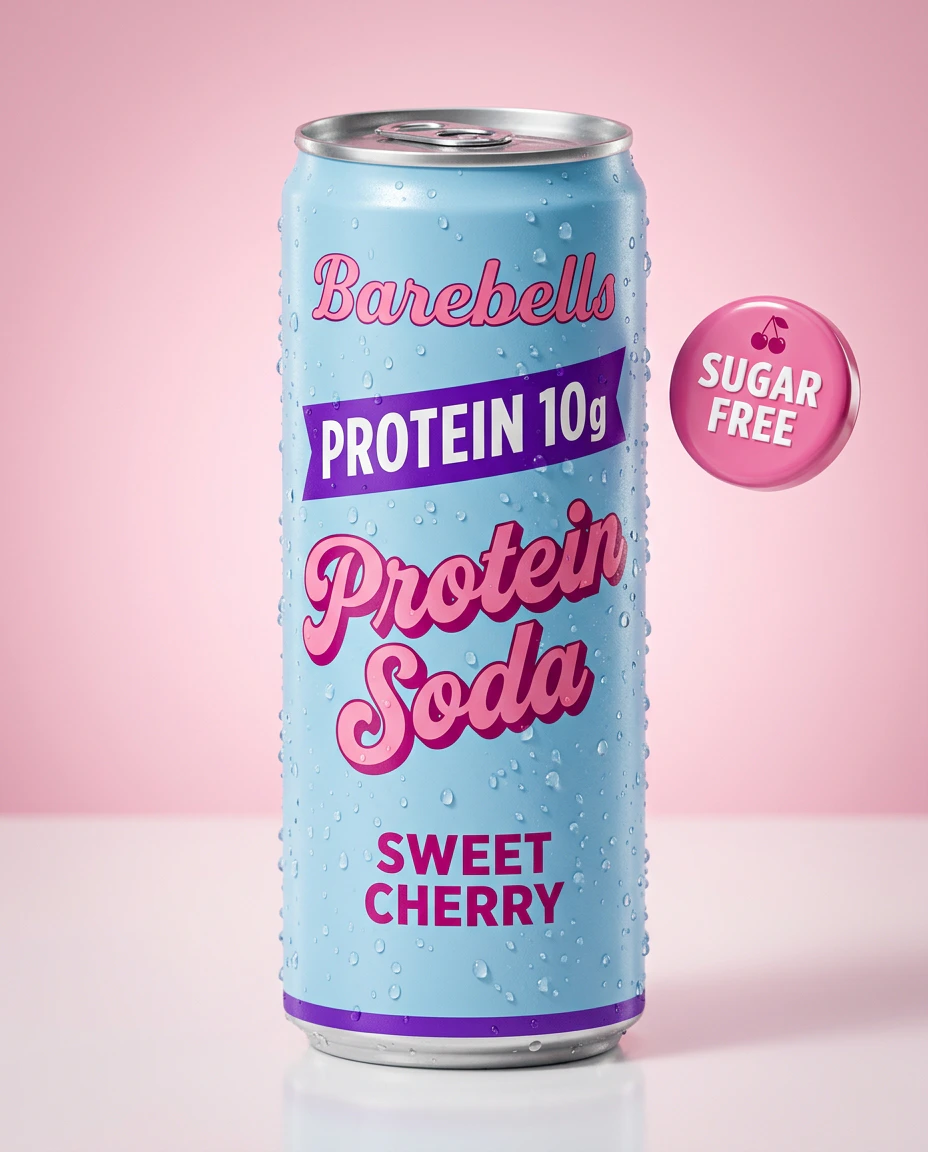
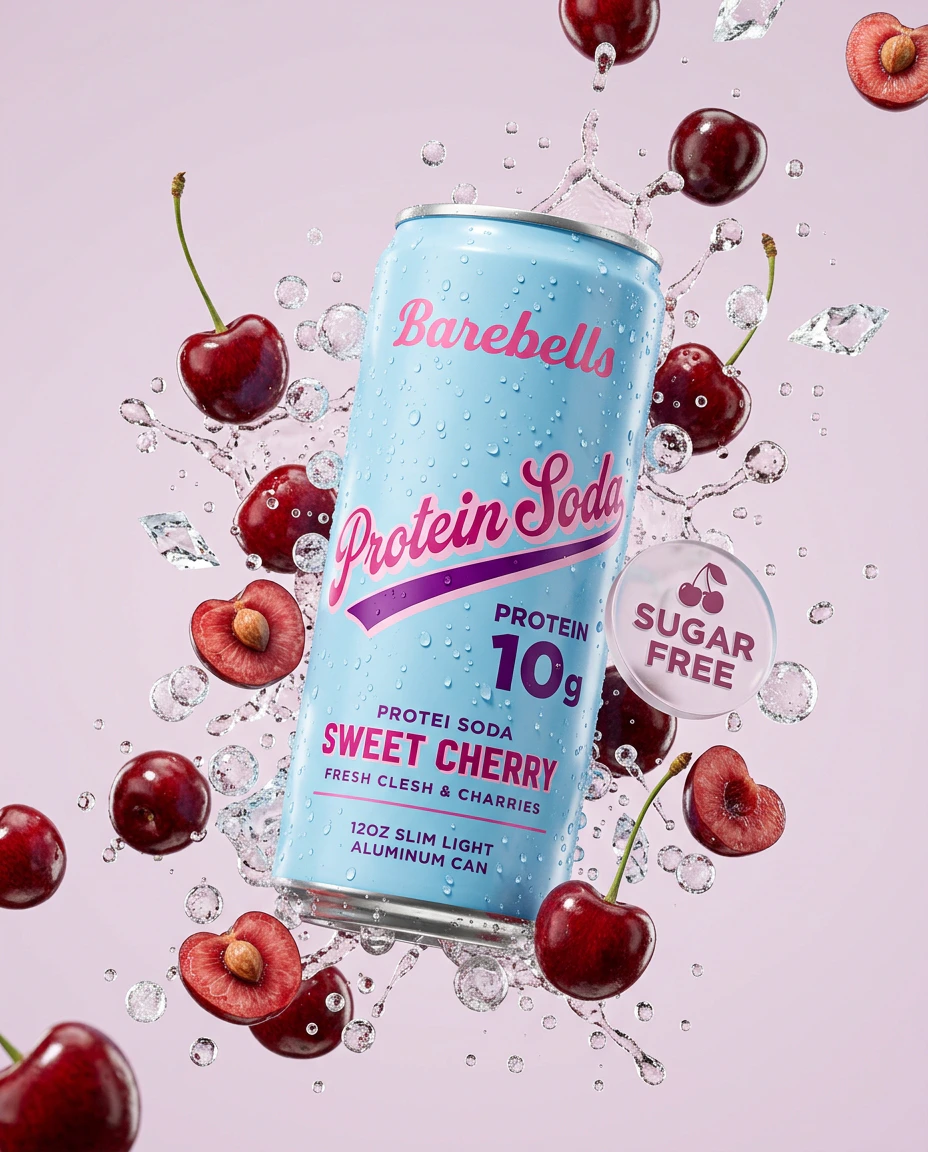
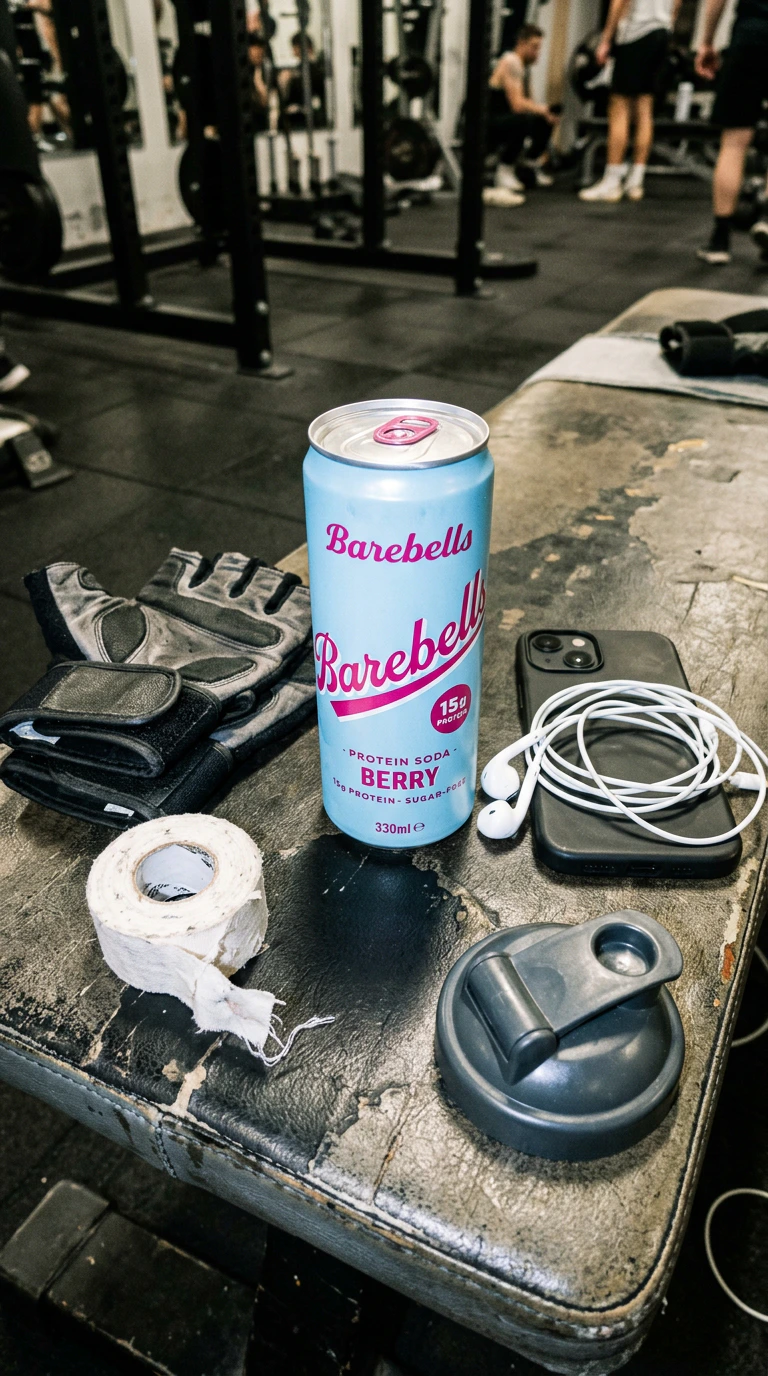
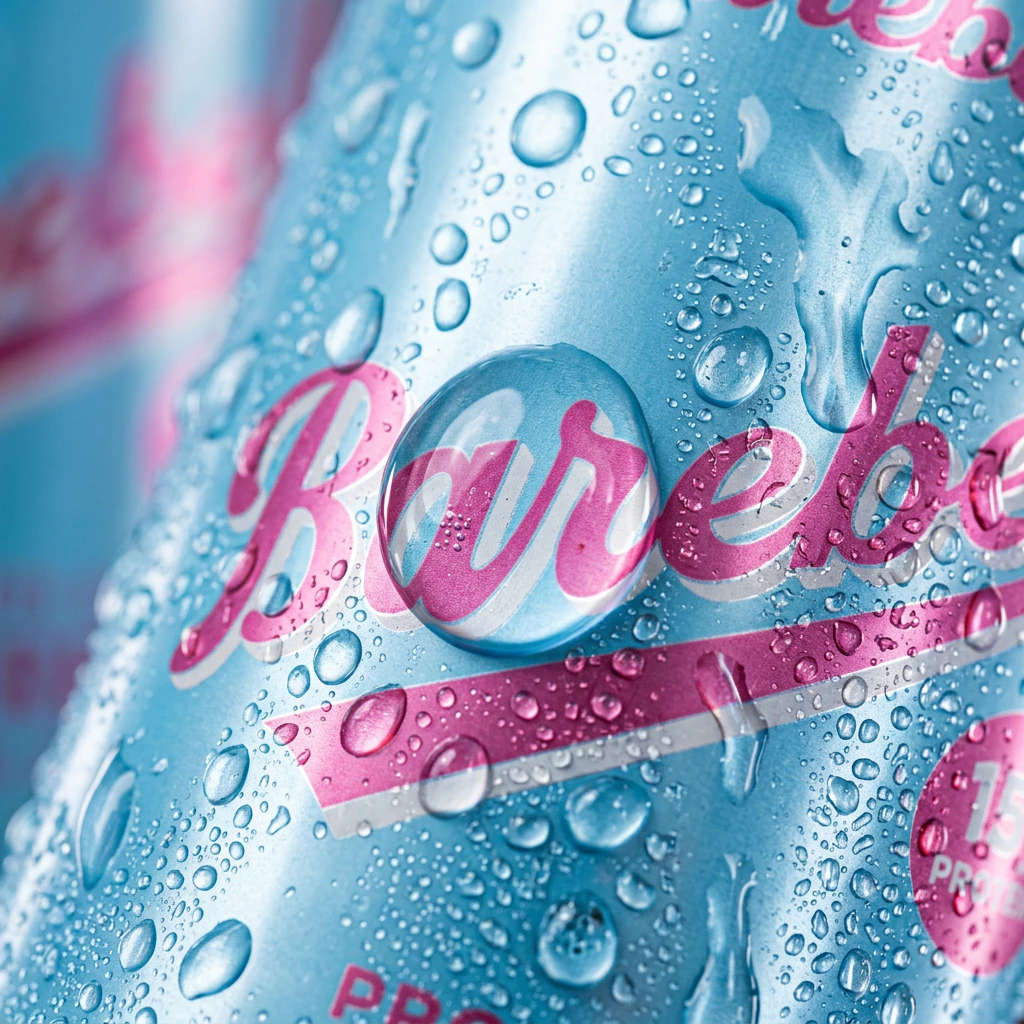
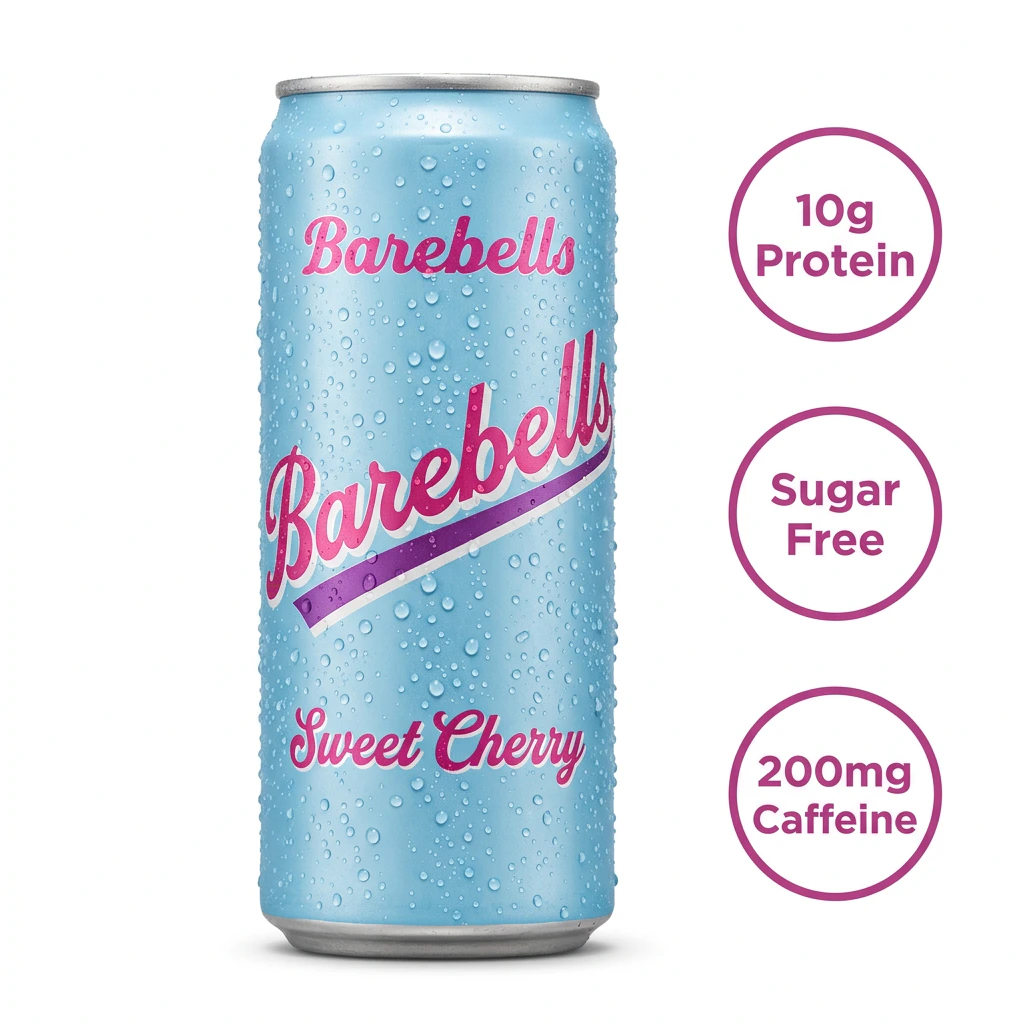
To show you how this playbook works in practice, we ran five prompts against a real product: Barebells Protein Soda (Sweet Cherry). Barebells is a Swedish functional food brand known primarily for their protein bars. Their Protein Soda line is a newer product; a carbonated, sugar-free drink with 10g of protein and 200mg of caffeine in a slim 12oz can. The packaging features a light blue can with retro pink script lettering and a purple accent stripe. We chose Barebells because it is a strong test case: the can has complex text rendering (script font, multiple text elements, attribute callouts), a distinctive color palette, and a physical form factor (slim aluminum can with condensation) that challenges AI image models. We selected five prompts from this playbook that cover the most common DTC creative needs: a studio hero, an ingredient burst, a lifestyle/UGC shot, a sensory macro, and an Amazon-compliant PDP image. Here is what we generated.ⓘ A note about taste: Your first outputs may not feel ‘on-brand’ and that’s expected. AI image generation is a directed craft, not a vending machine. The prompts in this playbook are starting points.Lighting, mood, composition, color grading, all of it responds to specificity. If something looks off, the answer is iteration, not abandonment. The brands getting the most out of these tools treat prompting like a creative brief: the more precise the direction, the tighter the output. Prompt 1 — Product Hero Shot This is the foundation of any product page. We needed a clean, studio-quality isolated shot that could serve as the primary image on a Shopify PDP or retargeting ad.
Part 5: The 25 Prompts
Prompt 1 — The Product Hero Shot Studio-quality isolated product on a clean or gradient background. Drives highest CTR on Amazon and Google Shopping for primary PDP images or retargeting ads. Input Variables- [Product Description]: [ex: A matte black protein powder tub with gold foil lettering]
- [Brand Name]: [Your Brand Name]
- [Benefit Text]: [ex: 25G PROTEIN]
- [Color]: [Background color, ex: soft blue]
- [Badge Text]: [ex: KETO]
- [Target Demographic]: [ex: fit woman in her 30s]
- [Product]: [ex: green juice bottle]
- [Action]: [ex: laughing while walking]
- [Brand Name]: [Your Brand Name]
- [Setting]: [ex: sunny outdoor farmers market]
- [Product Name]: [Your Product Name]
- [Product Packaging Description]: [ex: amber glass bottle with white label]
- [Key Ingredients]: [ex: sliced lemons, raw ginger root, turmeric powder]
- [Liquid Type]: [ex: water, oil, serum]
- [Hex Code]: [Background color code, ex: #F4F4F4]
- [Product Name]: [Your Product Name]
- [Product]: [Visual description of product]
- [Texture]: [Surface material, ex: marble, wooden, concrete]
- [Color]: [Wall color]
- [Headline]: [ex: DEEP SLEEP]
- [Text Color]: [Color of headline text]
- [CTA]: [ex: SHOP NOW]
- [Product Name]: [Your Product Name]
- [Surface]: [ex: bedside table, bathroom counter]
- [Context Items]: [ex: car keys, half-drunk glass of water, open magazine, hair ties]
- [Texture Description]: [ex: thick white cream, carbonated liquid]
- [Specific Detail]: [ex: a smear of cream, condensation droplets on a cold can]
- [Product Description]: [Visual description of product]
- [Seasonal Elements]: [ex: dried maple leaves, miniature pumpkins, cinnamon sticks]
- [Seasonal Lighting Condition]: [ex: warm golden hour sunlight casting long shadows]
- [Seasonal Copy]: [ex: FALL FAVORITES]
- [Product Description]: [Visual description of product]
- [Attribute 1]: [ex: 20g Protein]
- [Attribute 2]: [ex: Keto]
- [Attribute 3]: [ex: 0g Sugar]
- [Product Description]: [Visual description of product]
- [Surface Material]: [ex: white marble counter]
- [Background Texture]: [ex: soft blurred kitchen tiles]
- [Product Description]: [Visual description of product]
- [Messy Environment]: [ex: cluttered bathroom shelf with other toiletries]
Prompt 11 — The Flat Lay Arrangement Perfect for bundles, starter kits, and “what’s inside” ads. This overhead angle organizes chaos into a satisfying, logical structure that performs exceptionally well for skincare routines and subscription boxes. Input Variables
- [Product List]: [ex: Serum bottle, moisturizer jar, face wash tube]
- [Props]: [ex: Eucalyptus leaves, raw ingredients, textured linen]
- [Background]: [ex: Marble slab, pastel pink matte surface]
Prompt 12 — The Unboxing Shot Captures the dopamine hit of a package arrival. Use this for middle-of-funnel retargeting or welcome flows to simulate the customer experience and build anticipation. Input Variables
- [Packaging Type]: [ex: Branded cardboard mailer, rigid luxury box]
- [Inner Material]: [ex: Crinkled tissue paper, custom inserts]
- [Product]: [The main item being revealed]
Prompt 13 — The Color/Variant Grid Essential for collection launches. This shot proves range and variety, helping customers self-select their preference immediately. High conversion potential for fashion basics and cosmetics. Input Variables
- [Product Type]: [ex: T-shirts, lipstick tubes, soda cans]
- [Color Palette]: [ex: Earth tones, neon variety, pastel gradient]
- [Layout Style]: [ex: 3x3 grid, diagonal repeating pattern]
Prompt 14 — The Size/Scale Reference Overcomes the “digital barrier” by showing physical context. Use this for jewelry, tech accessories, or travel goods where size ambiguity kills conversion rates. Input Variables
- [Product]: [Your product]
- [Reference Object]: [ex: iPhone 15, coffee mug, human hand, quarter]
- [Setting]: [ex: Desktop, bedside table, cafe table]
Prompt 15 — The Model Wearing/Using The “Social Proof” visual. Shows the product in action to help the viewer visualize themselves owning it. Critical for apparel, wearables, and outdoor gear. Input Variables
- [Model Description]: [ex: Woman in her 30s, athletic build]
- [Action]: [ex: Jogging, typing on laptop, drinking coffee]
- [Product Visibility]: [ex: Wearing smart glasses, holding a tumbler]
- [Setting]: [ex: Urban rooftop, coffee shop, hiking trail]
Prompt 16 — The Product Lineup The “Family Portrait” of your brand. Builds authority by showing catalog depth. Use this for top-of-funnel brand awareness ads to show you are a serious player, not a one-product dropshipper. Input Variables
- [Product Range]: [ex: Full skincare line: cleanser, toner, moisturizer]
- [Podium/Surface]: [ex: White stone steps, wooden risers, glass reflection]
- [Vibe]: [ex: Clinical and clean, warm and organic]
Prompt 17 — The Comparison Shot Visualizes your value proposition. While you can’t use real competitor logos in AI, you can use “generic” equivalents to highlight your premium materials or superior design. Input Variables
- [Your Product]: [Specific visual description of your premium item]
- [Generic Product]: [Description of cheap/standard alternative]
- [Contrast Feature]: [ex: Glowing vs. dull, sturdy vs. flimsy]
Prompt 18 — The Gift-Ready Shot Capitalizes on Q4 and holiday urgency. This prompt styles your product not as a utility, but as a present. Essential for “Gift Guide” landing pages and November/December ad spend. Input Variables
- [Product]: [Your product]
- [Wrapping Elements]: [ex: Satin ribbon, gift tag, bow]
- [Holiday Context]: [ex: Christmas tree lights in bokeh, Valentine’s confetti]
Prompt 19 — The TikTok Shop Native This prompt generates raw, vertical, “user-generated” style content perfect for TikTok, Reels, and Shorts. It intentionally degrades the “studio quality” to make the ad feel native to the feed, increasing hold rates. Use this for top-of-funnel awareness. Input Variables
- [Product]: The item being sold
- [Action]: How the user is interacting with it (holding it, applying it, wearing it)
- [Setting]: Where the video is being shot (messy bedroom, bright kitchen, gym car park)
Prompt 20 — The Before/After Split A classic direct response format reimagined with AI. This visualizes the transformation your product offers. Use this for problem-aware audiences who need visual proof of efficacy (skincare, cleaning, home organization). Input Variables
- [Problem State]: Visual description of the issue (ex: stained carpet, acne skin, cluttered desk)
- [Solved State]: Visual description of the result (ex: pristine carpet, glowing skin, organized desk)
- [Product]: The item that caused the change
Prompt 21 — The How-It-Works Sequence This prompt generates a triptych (three-panel) layout to explain a routine or assembly process. It reduces friction by showing the customer exactly what to do. Use for complex goods or multi-step routines. Input Variables
- [Step 1]: Visual of the first action
- [Step 2]: Visual of the second action
- [Step 3]: Visual of the final result
- [Style]: The aesthetic (minimalist vector, photorealistic studio, hand-drawn sketch)
Prompt 22 — The Subscription Box Reveal This simulates the dopamine hit of unboxing. It shows the value proposition of a bundle or subscription by displaying quantity and variety. Use for welcome offers or “build your own bundle” ads. Input Variables
- [Box Color/Branding]: Description of the packaging
- [Contents]: List of items inside
- [Surface]: Texture underneath the box (marble counter, wooden floor, bedspread)
Prompt 23 — The Detail Callout / Annotated Hero This prompt creates a high-end “tech specs” visual. It isolates the product and uses graphical lines to point out specific value props. Essential for products where material quality or specific engineering features justify the price point. Input Variables
- [Product]: The item
- [Feature 1]: Visual detail to highlight
- [Feature 2]: Visual detail to highlight
- [Background]: Usually solid color or gradient to make text pop
Prompt 24 — The Testimonial Card This blends social proof directly into the creative. Instead of overlaying text in post-production that looks pasted on, this prompt attempts to integrate the “review” aesthetic into the scene (ex: a note, a screen, or a floating graphic). Use for retargeting. Input Variables
- [Product]: The item
- [Setting]: Lifestyle environment
- [Quote]: Short 3-5 word review snippet (ex: “Best Sleep Ever”)
Prompt 25 — The Retargeting / FOMO Creative Designed to stop the scroll for cart abandoners. This prompt uses aggressive visual language—high contrast, bold colors, and “sale” aesthetics—to signal urgency. Input Variables
- [Product]: The item
- [Offer Text]: The deal (ex: 50% OFF, FLASH SALE)
- [Color Palette]: Usually red, yellow, or brand contrast colors
Part 6: Prompt Chaining & Batch Production
You cannot scale DTC creative by treating every prompt as a one-off art project. To feed the Facebook and TikTok algorithms, you need volume. We achieve this through Prompt Chaining and the 30-Minute Batch Workflow. The Seed Strategy AI generation is inherently random. If you find a generated image layout you love, you must lock the “Seed” (the random noise pattern used to generate the image). In NanoBanana 2, once you have a winning composition, keep the seed number constant and only change one variable at a time (ex: change the background color from “blue” to “red” or the model from “male” to “female”). This allows you to create consistent campaign assets rather than disjointed images. The 30-Minute Batch Workflow- Define Core Angles (5 Minutes): Don’t just say “shoes.” Define three distinct angles: The Commuter (shoes on subway), The Runner (shoes on track), and The Studio (floating product shot).
- Execution with Style Anchors (20 Minutes): Use “Style Anchors” in your prompts—specific photographers, lighting setups (ex: “Rembrandt lighting”), or artistic styles—to ensure brand consistency. Run your prompts in batches of 10.
- The Cull (5 Minutes): This is the most important step. You will generate garbage. That is part of the process. Apply the Rule of 5: For every 1 usable ad creative, you generally need to generate 5 options. Delete the failures ruthlessly.
Part 7: The Quality Gate
In the world of Generative AI, speed is easy; quality is the bottleneck. As we move from wellness-specific advice to broad DTC application, the “Quality Gate” becomes your primary defense against brand dilution. The Allocation Matrix Do not use AI for everything.- Tier 1 (Brand Hero): The main image on your homepage or packaging? Hire a human photographer. You need absolute control and 100% reality.
- Tier 2 (Performance Testing): Facebook ad variants, email headers, blog thumbnails? Use AI. This is where volume wins.
- Product Accuracy: If your sneaker has 6 eyelets, the AI cannot render 8. If your serum is blue, the AI cannot make it purple. You are liable for “bait and switch” if the creative doesn’t match the delivered goods.
- Text Accuracy: NanoBanana 2 is better at text, but not perfect. Zoom in on every label. Ensure “Ingredients” doesn’t spell “Ingrednet.”
- Claim Visualization: Be careful with “Before/After” generations. You cannot use AI to exaggerate results (ex: generating a person who lost 50lbs instantly). The visual claim must represent typical results.
- Platform Compliance: Meta and TikTok have strict policies against “non-existent functionality” (ex: play buttons that don’t play) or overly graphic zoomed-in body parts (common in skincare AI generations).